

Provisionally Selected Candidate and Reserve Panels at various departments
Selection Interviews for Guest Faculty positions at various academic departments
Addendum to Selection Interview list for Guest Faculty positions
Application Form
Link to the Application Form (Google Form).
Application Details
The details regarding qualifications, experience, screening guidelines, and prescribed application form—among others—are included in the document below. The applicants are required to read these details before filling up and submitting the prescribed application form.
Steps to print your copy of the Application Form
STEP 1: OPEN YOUR EMAIL
After submitting your application form online, you will receive a copy of it in your email, provided you have mentioned the correct email address (first response in Application Form).
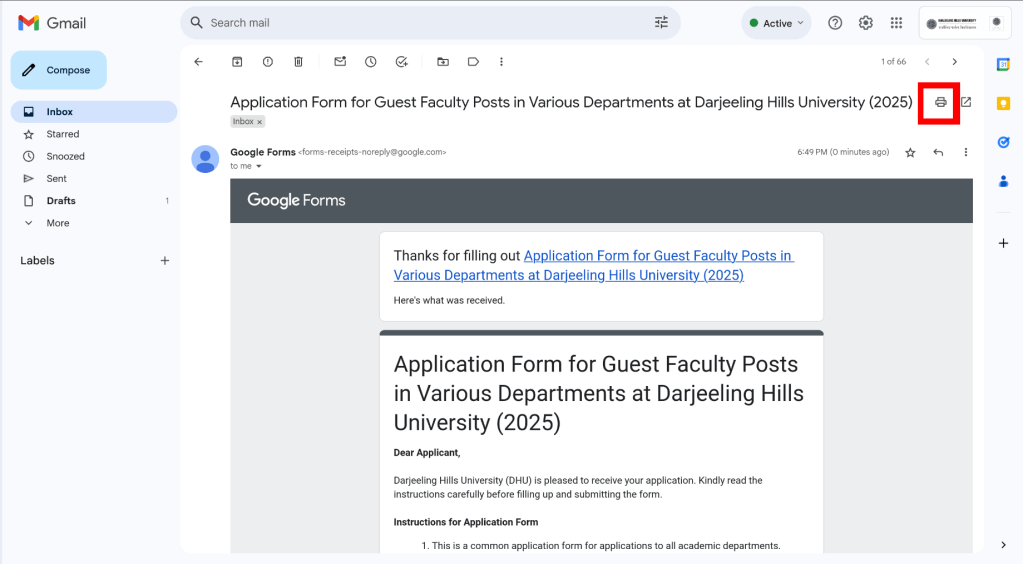
STEP 2: USE THE PRINT EMAIL FUNCTION
Use the print email function of your email service provider. The image below shows the option on the Google email service.
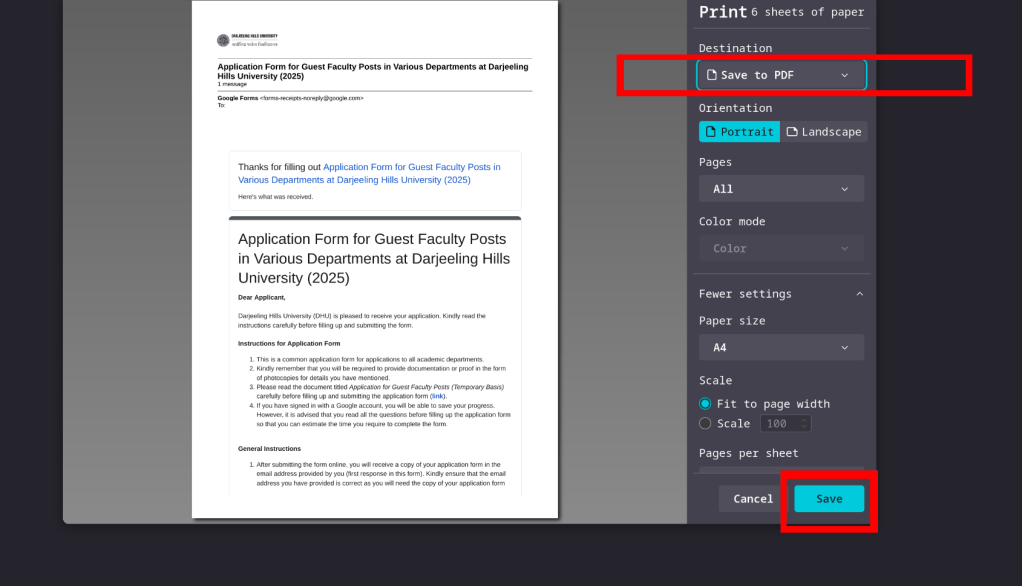
STEP 3: SAVE OR PRINT THE EMAIL
You can either save the email as a PDF document for printing it later, or directly print it. Processes and interface may slightly vary depending on your email service provider, browser, and operating system. The image below shows the option on the Google email service which is being used on a Mozilla Firefox browser.
 Darjeeling Hills University